Your Questions, Answered
We’ve assembled the most frequently asked questions about Eversense into one place. Got a question that you can’t find the answer to? Contact us.
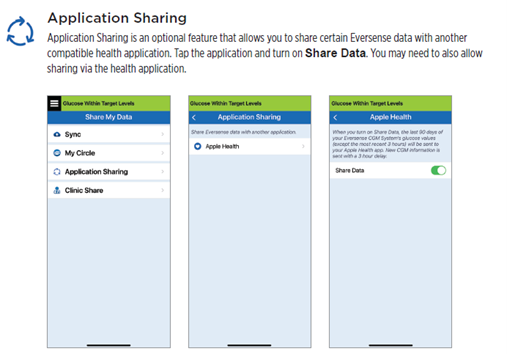
In the Eversense® 365 App, open the Main Menu and go to SHARE MY DATA -> APPLICATION SHARING -> APPLE HEALTH and toggle Share Data to ON
If you already have an Eversense® account, you do not have to create a new one to use Eversense® NOW.
- Click the link in the email invitation and sign into your existing Eversense® When you refresh the Home Page in your Eversense® NOW App, you will see the name of the CGM user whose invitation you accepted.
If you DO NOT already have an Eversense® account
- When you open the Eversense® NOW App for the first time, accept the End User License Agreement.
- Choose the unit of measure. The unit of measure you choose will apply to all of the Eversense® CGM users whose data you can view. You cannot change the unit of measure once the app is installed unless you delete and reinstall the app.
1. Go to the Apple App Store or Google Play™ and search for “Eversense NOW”.
2. Tap the Eversense NOW icon, download and install the app to your smart device.
3. When prompted, tap “Allow” in order to receive glucose related alerts from the Eversense® CGM users on your list.Precaution: If you do not allow notifications from the Eversense® NOW App, you will not receive glucose related alerts from Eversense® CGM users.
To view the glucose reports tap Menu > Reports and swipe to move across the three different reports. You can also email each report as a pdf file by tapping the email icon in the top right hand corner.
Types of reports:
- Glucose Pie Chart
- Time in Range
- Weekly Modal Summary
- Glucose Statistics
Eversense® NOW is a mobile App that allows the Eversense® users to share their data and information with friends and family. The Eversense® NOW user will be able to monitor the CGM glucose data of Eversense® CGM users.
Note: The Eversense® CGM user has the ability to add/remove friends and family from Eversense® NOW access to their data at any time.
Still have questions?
The Eversense team is dedicated and ready to provide the answers and support you need. Simply click the link below.
The Eversense® 365 Continuous Glucose Monitoring (CGM) System is indicated for continually measuring glucose levels for up to one year in people (18 years and older) with diabetes. The system is indicated for use to replace fingerstick blood glucose (BG) measurements for diabetes treatment decisions. Fingerstick BG measurements are required for calibration one time a week after day 13, and when symptoms do not match CGM information or when taking medications of the tetracycline class. The sensor insertion and removal procedures are performed by a health care provider. The Eversense 365 CGM System is a prescription device; patients should talk to their health care provider to learn more.
For important safety information, see bit.ly/eversensesafety
Eversense, Eversense 365 Continuous Glucose Monitoring, and the Eversense logo are trademarks of Senseonics, Incorporated. All other trademarks are properties of their respective owners and are used solely for informative purposes. No relationship or endorsement should be inferred or implied.
Apple Watch® is a product of Apple, Inc., and may be separately purchased from an authorized Apple retailer. Apple Watch is not included with the Eversense CGM System. Android is a trademark of Google LLC.
MKT-001692 Rev 1


 Call My Eversense Specialist Now
 Schedule a Call